
Arrow Pro 3D
Iridium Mobile TeamCasual
4.5432.00 Reviews
- Version
- 1.16.0
- Installs
- 1.00M
- Age Rating
- Everyone
Screenshots
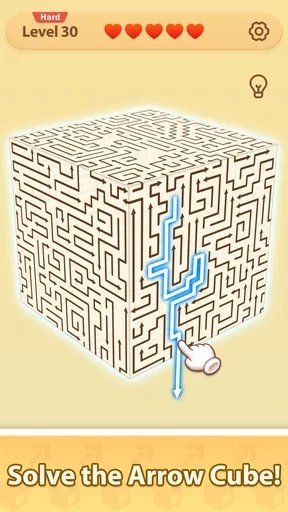
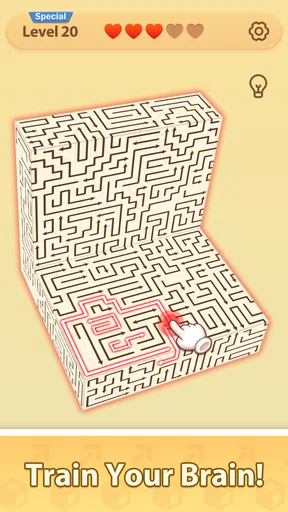
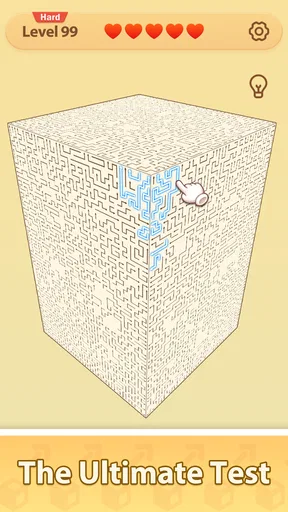
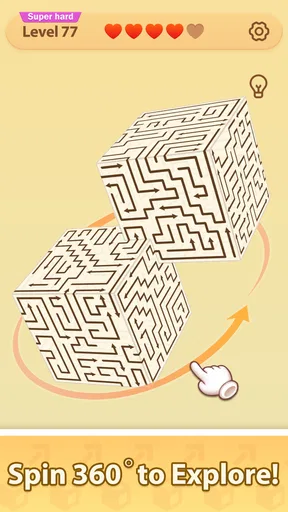
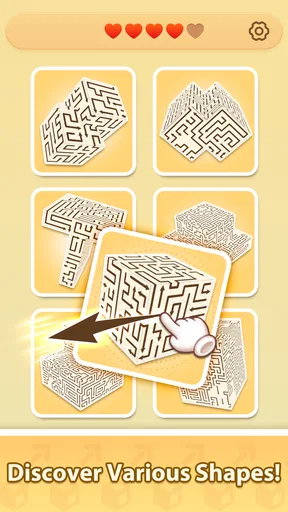
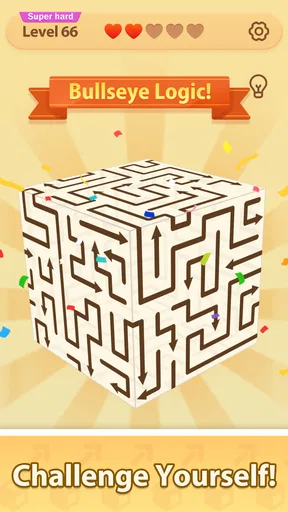
Our Review of Arrow Pro 3D
 Analysis by Appyee
I spent time with Arrow Pro 3D as a casual puzzle game, and its central idea is immediately easy to understand: a three-dimensional cube is rotated so that arrows can move along clear paths. The appeal comes from turning a simple visual rule into a small spatial challenge. I found myself making quick progress at first, then slowing down when several directions became possible and I had to stop treating the cube like a flat picture.
That makes it a good fit for short, low-pressure play. I can imagine opening it while waiting for an appointment, taking a few turns during a commute, or using it as a quiet break between more demanding tasks. It is free, aimed at Everyone, and comes from Iridium Mobile Team. The game has already reached over 500K installs and holds a 4.8 average from around 4.8K ratings, which matches my impression that its basic loop is easy for many people to pick up.
How the cube communicates its puzzles
The strongest part of the presentation is the relationship between the arrows and the cube. Instead of asking me to remember a long set of rules, the game puts the important information directly into the object I am manipulating. I can look for an arrow, consider the direction it points, and then decide whether rotating the cube will open a route. That visual connection makes the first few puzzles feel approachable even if I am not usually drawn to traditional logic games.
Readability becomes more important as the cube turns. A two-dimensional puzzle normally keeps its entire board in front of me, while this game makes me track faces that move in and out of view. I had to build a mental picture of which side was now facing me and which arrows might be hidden around an edge. This is not a flaw in itself; it is the main challenge. Still, anyone who finds rotating visual layouts tiring may need more time than the cheerful, casual presentation initially suggests.
I recommend looking at the whole cube before tapping repeatedly. My most useful habit was to pause after each rotation and identify the next arrow that could move, rather than chasing the first available path. That small change reduced accidental decisions and made the puzzles feel more deliberate. It also helped when several arrows appeared to compete for the same space, because I was planning around the cube instead of reacting to one face at a time.
Navigation is at its clearest when the goal is visible and the available move is obvious. The game does not need a complicated interface to explain its premise, and that restraint benefits players who prefer learning through action. On the other hand, the more crowded arrangements demand visual scanning. If you have difficulty distinguishing small directional symbols, the challenge may come from reading the board rather than solving it.
I would not describe the experience as text-heavy. The core interaction communicates through shapes, direction, movement, and the changing position of the cube. That can be helpful for players who prefer visual rules over written instructions, including people who do not want to read a large tutorial before playing. The trade-off is that the game relies heavily on interpreting orientation, so a player who needs explicit verbal explanations may find the visual language less comfortable.
Learning the rotation instead of fighting it
The first important adjustment is understanding that the cube is not merely a board that happens to look three-dimensional. Every rotation changes the relationship between the visible faces and the paths on them. I initially made the common mistake of focusing on an arrow without considering what would happen after the cube moved. Once I began treating each turn as a change to the entire puzzle, the game became more satisfying and less random.
A practical approach is to choose one face as a temporary reference point. I watch how that face moves, then use it to orient myself after a rotation. This is especially useful for players who lose track of direction when several sides are similar. It also makes the game more accessible in a broader sense: the player can create a personal method instead of relying on fast visual reactions.
Another helpful technique is to solve the least obstructed path first. When I tried to clear the most noticeable arrow immediately, I sometimes rotated the cube into a less useful position. Looking for the route with the fewest complications gave me a better starting point. This is a concrete strength of the design because the game rewards observation and planning, not just quick tapping.
Motor, sensory, and situational access
The physical demands appear modest because the main action is rotating the cube and selecting paths. I did not need a complex control scheme to understand what to do. That makes the game more approachable than casual titles built around rapid sequences, repeated swipes, or precise timing. A player who prefers slower decision-making can engage with the puzzle on their own rhythm, at least when the board itself is easy to read.
There is still an important distinction between simple controls and effortless controls. Rotating a three-dimensional object requires a clear gesture or tap interpretation, and repeated corrections can become frustrating if a player has limited dexterity, tremors, joint pain, or difficulty with fine touch input. Because the game’s challenge depends on placing the cube in the intended orientation, an imprecise gesture can affect the puzzle rather than merely slowing down a menu.
For that reason, I would play with the device held steadily and use slower, intentional movements. I found that trying to rush made me more likely to rotate past the face I wanted. A player with motor limitations may benefit from treating every move as a separate action, allowing time to confirm the new view before continuing. That will not remove the physical demand, but it can reduce unnecessary repetition.
The sensory side is more mixed. The arrows provide a strong visual cue, and the cube gives the game a clear spatial identity. Players who enjoy diagrams, orientation, and object manipulation may find that combination comfortable. Players with low vision, visual processing differences, or difficulty distinguishing directional symbols may face a steeper barrier, particularly when arrows are close together or partly hidden by the cube’s perspective.
I would also be cautious about assuming that a colorful three-dimensional presentation is automatically easy to perceive. Depth, changing angles, and visual clutter can each add effort. A player who is sensitive to motion may prefer brief sessions and pauses between puzzles. Someone who becomes disoriented by rotating objects should test the game gently rather than committing to a long play session. My experience suggests that the spatial movement is central to the fun, so it is also the part most likely to determine whether the game feels comfortable.
Sound is not the reason I would choose this game, and the puzzle concept can be understood visually. That may suit people who play without audio in public or who prefer quiet games. It also means that the visual feedback carries much of the responsibility for confirming progress. If a player cannot comfortably rely on the screen’s directional cues, the experience may be less clear than it is for someone with strong visual tracking.
Playing in ordinary, imperfect situations
Arrow Pro 3D works best when I have enough attention to inspect the cube. It is suitable for a short break, but it is not always ideal for a noisy queue, a moving vehicle, or a situation where I am repeatedly interrupted. A single puzzle may look casual, yet solving it depends on remembering orientation from one move to the next. If I put the phone down halfway through, I may need a moment to reconstruct what I was planning.
That makes it different from a purely reflex-based time filler. In a waiting room, I can play comfortably if I have a stable seat and a few uninterrupted minutes. On a crowded bus, however, the combination of hand movement and visual concentration may be less pleasant. The game’s low-pressure structure helps, but the three-dimensional board still asks for attention that a noisy environment can take away.
Brightness and screen size also matter in practical use. On a larger display, the cube is easier to inspect and the directions are less likely to blend together. On a smaller phone, I would avoid playing with the screen dimmed too far, especially when the puzzle places several arrows near one another. This is not a reason to reject the game, but it is a useful reminder that visual clarity depends on the context in which it is played.
I can see it working well as a quiet wind-down activity because it gives the mind one concrete problem without demanding a long story or a complicated set of characters. It is less suitable for someone seeking a game that can be played almost unconsciously. Even the simplest-looking board benefits from a deliberate scan, and later puzzles can punish hurried assumptions.
The Everyone age rating makes the concept broadly approachable, particularly for families looking for a puzzle that does not depend on mature themes. I would still introduce it by demonstrating the rotation idea rather than handing over the phone with no explanation. A child or an older player who understands the arrow rule may enjoy experimenting with the cube, while someone unfamiliar with three-dimensional spatial tasks may need encouragement to rotate slowly and observe the result.
Where the experience still creates friction
The biggest limitation is that the game’s accessibility and its difficulty are closely connected. The same rotating cube that makes the puzzles distinctive can also make them harder to parse. A flat grid would be easier to scan, and a conventional matching game would place less pressure on spatial memory. If your priority is maximum visual simplicity, one of those alternatives may be a better choice.
There is also a difference between understanding the rule and consistently applying it. I could explain what the arrows were doing almost immediately, but that did not mean I always knew which rotation would help. Players who prefer predictable progress may find the shift from easy boards to more mentally demanding arrangements abrupt. The game is casual in its presentation, not necessarily effortless in every puzzle.
Another trade-off is that the game rewards a particular kind of attention. It favors people who enjoy mentally turning objects, tracking faces, and planning several moves ahead. If you prefer word puzzles, number puzzles, or games where every relevant item stays visible, the cube may feel like unnecessary complexity. That is a matter of taste, but it is important when deciding whether the game belongs on your phone.
I also would not choose it for fast social play. The design seems better suited to individual concentration than to a group activity where everyone is talking and taking turns. A person looking for a party game, a competitive leaderboard experience, or a narrative adventure should look elsewhere. Arrow Pro 3D earns its place through focused spatial problem-solving, not through a broad range of modes.
The current version is 1.13.0, and the game is available free of charge. That lowers the barrier to trying it, especially for someone who is unsure whether three-dimensional arrow puzzles will suit them. Free access does not change the central question, though: can you comfortably read and manipulate the cube? If the answer is no, the absence of a purchase price will not solve the underlying usability issue.
Iridium Mobile Team has kept the concept focused enough that I could explain it to another person in a few seconds. That clarity is valuable, but it also means the game has a narrow identity. I would not install it expecting a large collection of unrelated activities. I would install it specifically for the cube-and-arrow loop, then decide whether that loop remains enjoyable after the novelty of the first puzzles fades.
Who I would recommend it to
I would recommend this game to players who like compact logic challenges and want something more spatial than a standard tile or word puzzle. It is especially appealing if you enjoy testing a solution, rotating an object, and learning from a wrong turn without a heavy story surrounding the task. The absence of complicated controls makes it approachable, while the three-dimensional structure gives experienced puzzle players something to think about.
It is also a reasonable choice for a family device when different people want to try the same simple concept at their own level. One person can focus on discovering how the cube behaves, while another can spend longer planning a route. Because the game is rated Everyone, its premise is broadly suitable, though individual comfort with visual rotation and touch controls still matters more than the age label alone.
I would suggest skipping it if you experience discomfort from moving visual scenes, have difficulty tracking directional symbols, or want a puzzle that keeps every option fixed in one plane. I would also skip it if your ideal casual game is based on rapid rewards and almost automatic play. This one asks me to stop, inspect, and think. That is its value, but it is also its demand.
For players with motor or sensory considerations, I would treat the first session as a personal test. Use a stable grip, play in good lighting, and begin with short rounds. Notice whether the cube remains understandable after several rotations and whether the required gestures feel controlled. Those practical checks tell you more about fit than the broad casual label does.
An inclusive verdict on the cube-and-arrow format
My overall view is positive, with a clear qualification: Arrow Pro 3D is most successful when its visual spatial language matches the way you naturally think. I like that the game does not bury the main idea under a long tutorial or a complicated interface. The arrows, the cube, and the paths create a focused puzzle relationship that is easy to describe but surprisingly engaging to solve.
Its inclusive potential comes from the gentle pace, compact rule set, and limited control demands. A player does not need fast reflexes or a large vocabulary to begin. Someone playing without sound can still understand the central task through the board. Someone with limited time can approach it in short sessions. Those are meaningful advantages for everyday use, particularly when I want a game that can fit around my schedule instead of taking it over.
Its barriers come from the same source as its personality. Rotating viewpoints can challenge visual processing, small directional details can demand careful reading, and touch accuracy can affect the outcome. The game is therefore not universally comfortable simply because it is casual. Players who need a stationary, high-contrast, or highly explicit puzzle format may be better served by a different style of game.
My best practical advice is to play slowly, keep one cube face as a reference, and inspect the entire object before committing to a rotation. That approach reduces confusion and reveals more of the intended strategy. It also turns the game from a sequence of guesses into a manageable visual planning exercise, which is where I found the most satisfaction.
In the end, I see this as a focused free puzzle for people curious about spatial challenges but unwilling to learn a complicated system. Its 4.8 average and over 500K installs suggest strong interest, while my own experience explains why: the premise is approachable, the sessions are easy to start, and the cube offers more thought than its casual appearance promises. If you enjoy calm, visual problem-solving and can comfortably follow a rotating object, this is worth trying; if fixed layouts and minimal visual movement matter more to you, choose a flatter alternative instead.
Verdict
Strengths of Arrow Pro 3D
- Smooth 3D arrow design with clean, polished visuals.
- Useful for creating eye-catching directional graphics quickly.
- Offers a distinctive style for presentations and social content.
- Easy to understand for users familiar with basic editing tools.
- Suitable for adding depth and dimension to otherwise flat designs.
Limitations of Arrow Pro 3D
- Advanced customization options may feel limited for experienced designers.,3D effects can look excessive in minimalist projects.
- Export options may not suit every professional workflow.
- Detailed graphics may require more device storage than simple icons.
- Some features may take time to master without built-in guidance.
Similar Picks in This Category
View All
My Talking Angela
Outfit7 Limited4.2

My Talking Tom
Outfit7 Limited4.3

Pou
Zakeh4.2

My Talking Tom 2: Pet Game
Outfit7 Limited4.3

Candy Crush Saga
King4.6

Bridge Race
Supersonic Studios LTD4.1
Frequently Asked Questions
What is Arrow Pro 3D, and how is the gameplay structured?
Arrow Pro 3D is a casual puzzle game built around arranging, rotating, or launching arrow-shaped pieces so they can move through the level without colliding with obstacles. The early stages are designed to teach the basic mechanics, while later puzzles introduce tighter spaces, blocked paths, and more complicated sequences. It is easy to start, but completing levels efficiently requires careful observation and planning.
Can Arrow Pro 3D be played offline?
Arrow Pro 3D is generally suitable for short offline sessions, which makes it convenient for travel or situations without a stable connection. However, some features may still require internet access, including advertisements, optional rewards, analytics, updates, or promotional content. If offline play is important to you, test the game after disabling your connection, since availability can vary between versions and devices.
Is Arrow Pro 3D free to download and play?
The game is typically available as a free download, allowing users to access its main puzzles without paying upfront. Like many casual mobile games, it may include advertisements and optional in-app purchases, such as removing ads, obtaining hints, or unlocking bonuses. Before downloading, review the store listing and your device’s purchase settings, especially if children may use the device.
Does Arrow Pro 3D contain many advertisements?
Players should expect advertising to be part of the free gameplay experience. Ads may appear between levels, after failed attempts, or when claiming optional rewards such as extra hints or coins. The frequency can depend on play time, region, and the current version of the app. If interruptions become distracting, check whether the game offers a paid ad-removal option.
What devices are recommended for playing Arrow Pro 3D?
Arrow Pro 3D is designed for modern Android and iOS smartphones and tablets, and its simple puzzle presentation should run comfortably on most reasonably recent devices. For the best experience, keep the operating system updated and maintain sufficient free storage for installation and future updates. Older phones may experience slower loading, reduced performance, or compatibility limitations depending on the version available.
Play our best games!


